
Quickly Access ChatGPT Conversations with One Click
Overview
The AboutChatGPT Bookmark extension is designed to streamline access to specific ChatGPT conversations. By allowing users to bookmark individual dialogues, it eliminates the need to search through lengthy chat histories to locate a particular exchange. This functionality is particularly useful for professionals, students, and content creators who frequently reference prior discussions for research, writing, or project planning. The tool functions as a digital bookmark system within the browser, enabling rapid retrieval of key messages with minimal effort.
Target users include anyone who relies on consistent access to past AI interactions. The extension operates directly within the browser environment, integrating seamlessly with the ChatGPT interface. Its primary purpose is to enhance workflow efficiency by reducing time spent navigating chat histories. The developer, AboutChatGPT, appears to focus on creating practical tools that improve user interaction with AI platforms. Real-world applications include saving research summaries, referencing creative ideas, or revisiting technical explanations for future use.
While specific developer background details are not provided, the tool’s functionality suggests a focus on usability and productivity. The extension does not require installation beyond browser add-on setup, making it accessible to users across both Windows and Mac platforms. It is designed for individuals who value speed and organization in their digital workflows.
Key Features & Capabilities
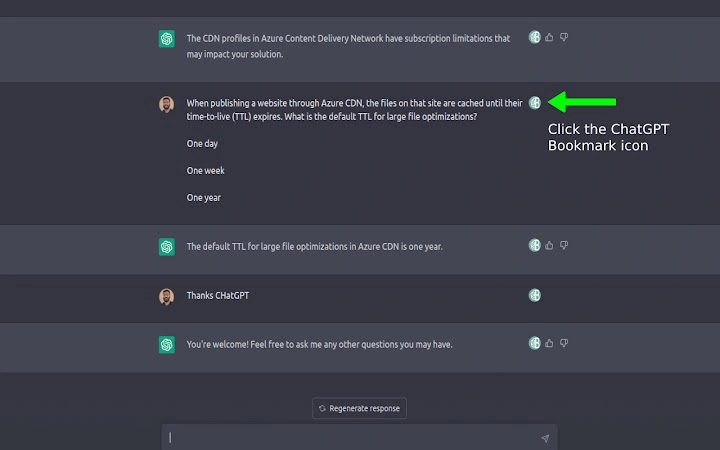
- Conversation Bookmarking – Users can save specific ChatGPT conversations with a single click, creating a direct link to the message within the chat thread.
- One-Click Access – Bookmarked conversations are stored in the extension’s interface, allowing instant retrieval by clicking on the saved link.
- Direct Message Navigation – When a bookmark is selected, the extension opens the relevant ChatGPT session and scrolls directly to the saved message.
- Browser Integration – The tool functions as a native browser extension, requiring no additional software or complex setup.
- Lightweight Design – With a file size of 1.2 MB, the extension is optimized for minimal resource usage and fast loading.
These features support efficient workflow management by reducing context-switching and manual searching. For example, a researcher can bookmark a detailed explanation of a scientific concept and return to it without retracing the entire conversation. A writer may save a brainstorming session with AI and revisit it during drafting. The extension also supports repeated use across multiple sessions, making it ideal for ongoing projects that depend on consistent AI input.
User Interface, Workflow & Performance
The user interface is minimal and focused on functionality. The extension appears as a small icon in the browser toolbar, with a clean layout that displays saved bookmarks in a list format. Navigation is intuitive, with each bookmark acting as a direct link to the corresponding message in ChatGPT. Users can view, select, or remove entries without disrupting their current workflow.
Workflow efficiency is enhanced by the one-click access model, which reduces the number of steps required to retrieve information. The extension does not alter the ChatGPT interface but operates in parallel, preserving the original user experience. Performance is expected to be smooth, given the lightweight nature of the tool. However, exact performance details were not specified.
The developer did not provide additional system requirements or resource usage data. Stability is assumed to be consistent with standard browser extensions, though real-world behavior may vary depending on browser type and background processes. No reported issues with crashes or lag were mentioned in available information.
Compatibility & System Requirements
The AboutChatGPT Bookmark extension is compatible with both Windows and Mac operating systems. It functions as a browser-based tool, meaning it runs within supported web browsers such as Chrome, Firefox, or Edge, though specific browser support was not detailed.
The extension has a file size of 1.2 MB, indicating a lightweight footprint. This suggests it is optimized for fast installation and minimal impact on system performance. The software version is 1.0, indicating an initial release with core functionality.
Exact system requirements were not listed. Compatibility information is limited to the operating systems mentioned. No hardware specifications or memory usage details were provided. Users are advised to ensure their browser is up to date for optimal functionality.
Pros and Cons
Pros
- Simple, intuitive interface for quick access to past conversations
- Efficient one-click retrieval of specific messages in ChatGPT
- Lightweight at just 1.2 MB, minimal impact on system resources
- Designed for productivity-focused users of AI tools
- Free to use with no hidden costs or subscriptions
Cons
- Compatibility with specific browsers was not confirmed
- No information on sync across devices or cloud backup
- Functionality is limited to saving and accessing messages within the browser
- Exact performance metrics were not provided
- Developer background details are not publicly available
FAQ Section
Is the AboutChatGPT Bookmark extension free to use?
Yes, the extension is available at no cost. There are no subscription fees or in-app purchases required to access its core features.
Which operating systems does the extension support?
The extension is compatible with both Windows and Mac operating systems, as confirmed by the developer.
Can I use the extension across multiple devices?
There is no information available about cross-device sync or cloud storage. The extension’s behavior on multiple devices is not specified.
Is the extension secure to use with sensitive conversations?
The extension operates within the browser environment and does not transmit data to external servers. However, no official security details were provided.
How often is the extension updated?
Information on update frequency was not included. Users should check the browser’s extension store for the latest version.
Final Thoughts + CTA
The AboutChatGPT Bookmark extension delivers a focused and effective solution for users who frequently revisit AI-generated content. Its ability to instantly access specific messages within ChatGPT conversations enhances productivity and reduces time wasted on manual searches. The lightweight design and free access make it an accessible tool for students, professionals, and creatives alike.
While limitations exist in terms of cross-device support and detailed system information, the extension excels in its core function: simplifying access to past interactions. For anyone relying on ChatGPT for research, writing, or planning, this tool offers a practical advantage without complexity.
Download AboutChatGPT Bookmark now to streamline your workflow and keep your most valuable AI conversations at your fingertips.







